Avatar and profile picture square maker

Square Profile Picture Maker

Create a square profile picture with circle avatar preview, rounded corners, and custom size export.

Drop a photo to make a square profile picture

or

Best for avatars, profile images, creator icons, work accounts, and app settings.

Allowed file types: JPG, PNG, WebP

512px and 1024px presets ·Circle preview ·Rounded corners
Make a Square Profile Picture for Any App

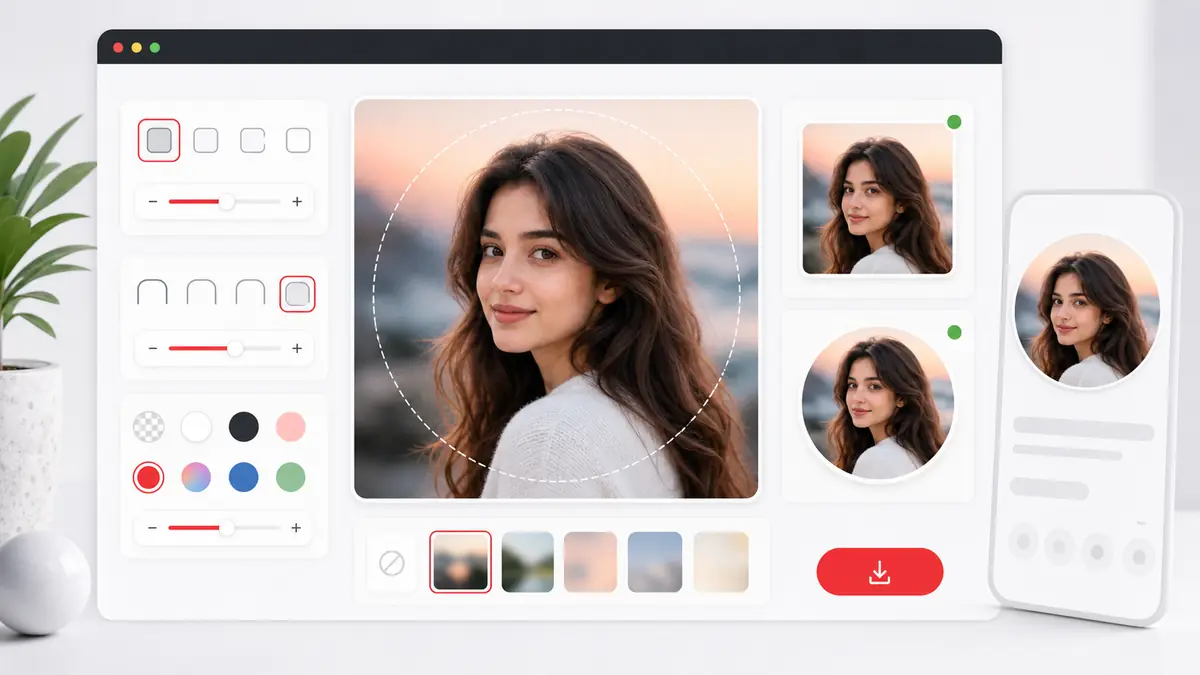
This page is built for people who need a square profile picture that still looks correct after an app turns it into a circle. Use the circle avatar preview to center the face or logo, add rounded corners when you want a softer look, and export a clean square profile picture at the exact size you need.

Square profile picture maker showing rounded corners and circle avatar preview around a centered portrait photo
Square profile picture preview: center the subject, check the circle avatar guide, and export a square image for profile uploads.

How to make a square profile picture

1

Upload a portrait, selfie, or logo

Start with the image you want to use as an avatar, profile photo, account icon, or team headshot.

2

Choose the square framing method

Use Color Background or Blur Background when you want to keep the full photo visible, or switch to Crop and Zoom when the face needs tighter framing.

3

Turn on the circle avatar preview

The preview shows how the square profile picture will look when a platform masks it into a circle, so you can keep eyes, face, and logo details inside the safe area.

4

Pick size, corners, and format

Export the final avatar at 512px, 1024px, 2048px, or a custom square size with optional rounded corners.

Why use this square profile picture maker

Circle avatar preview

The circle guide helps you build an avatar image that still looks centered after a platform applies a circular mask.

Rounded corners on export

Add a subtle corner radius for modern profile cards, or push the slider to 50% when you want a circle-style export in PNG or WebP.

Custom square size

An avatar image is not always 512px or 1024px. This page lets you enter the exact pixel size your app, marketplace, forum, or CMS expects.

No-crop avatar option

Use blur or color background mode when you need a profile image without cutting off hair, shoulders, icons, or brand marks.

Manual crop when needed

Switch to Crop and Zoom when the avatar needs a tighter face crop for LinkedIn, Discord, Slack, or internal team directories.

Private browser workflow

The image is rendered locally in the browser, so there is no account signup and no need to upload it to a remote editor.

Useful for people and logos

The same workflow works for portraits, company icons, creator brand marks, podcast cover avatars, and startup team photos.

Best uses for a square profile picture

Social profiles

Create a square avatar for Instagram, X, Threads, TikTok, Facebook, or YouTube so the subject stays centered before the app crops it.

Work accounts

Prepare a square avatar image for Slack, Google accounts, Microsoft profiles, Notion workspaces, and internal team directories.

Creator branding

Build a profile avatar for newsletters, podcasts, course platforms, community avatars, and creator storefronts.

App and SaaS settings

Use a square avatar image when a product dashboard or customer portal expects a 1:1 upload with a specific pixel size.

Gaming and community platforms

A square avatar image is useful for Discord, Twitch, Steam communities, forums, and game launchers where icons are often shown inside circles.

Team and speaker cards

Create a square headshot source for speaker pages, staff directories, author bios, event lineups, and testimonial sections.

Square profile picture FAQ

What size should a square profile picture be?

512x512px and 1024x1024px are strong defaults, but some platforms need a different size. This tool also supports custom square dimensions.

Why use a circle avatar preview?

A circle guide lets you check whether the face, eyes, logo, or icon stays inside the safe area before a platform masks the uploaded image into a circle.

Can I make a square profile picture without cropping?

Yes. Choose Color Background or Blur Background to keep the full photo visible while still exporting a square avatar image.

Can I crop tighter for headshots?

Yes. Crop and Zoom mode is useful when the avatar needs a closer face crop for business profiles or team directories.

Do rounded corners change the file itself?

Yes. Rounded corners affect the exported image. If you want transparent corners, use PNG or WebP rather than JPG.

Can I make a circular avatar file?

Yes. Set the corner slider to 50% and export as PNG or WebP if you want a circle-style avatar file with transparent outer corners.

Is this square profile picture maker private?

Yes. The image is generated locally in your browser and does not need to be uploaded to a server.

Can I use a custom size for a profile picture square upload?

Yes. Select Custom Size and enter the exact square pixel value required by your app, marketplace, CMS, or brand guideline.

Should I use PNG or JPG for a square profile picture?

PNG is best when you want cleaner edges, transparency, or rounded corners. JPG is fine for a regular photo when file size matters more.

Who should use a square profile picture maker?

Anyone who uploads avatars regularly can use a square profile picture maker, including creators, founders, marketers, recruiters, community managers, and support teams.