Discord avatar and PFP size converter

Discord Profile Picture Size Converter

Resize a photo or logo into a square Discord avatar with 512px and 128px presets plus circle safe-area preview.

Drop an image to make a Discord profile picture

or

Best for Discord PFPs, server-style icons, gaming avatars, logos, and community profiles.

Allowed file types: JPG, PNG, WebP

512px default ·128px preset ·Circle preview ·PNG
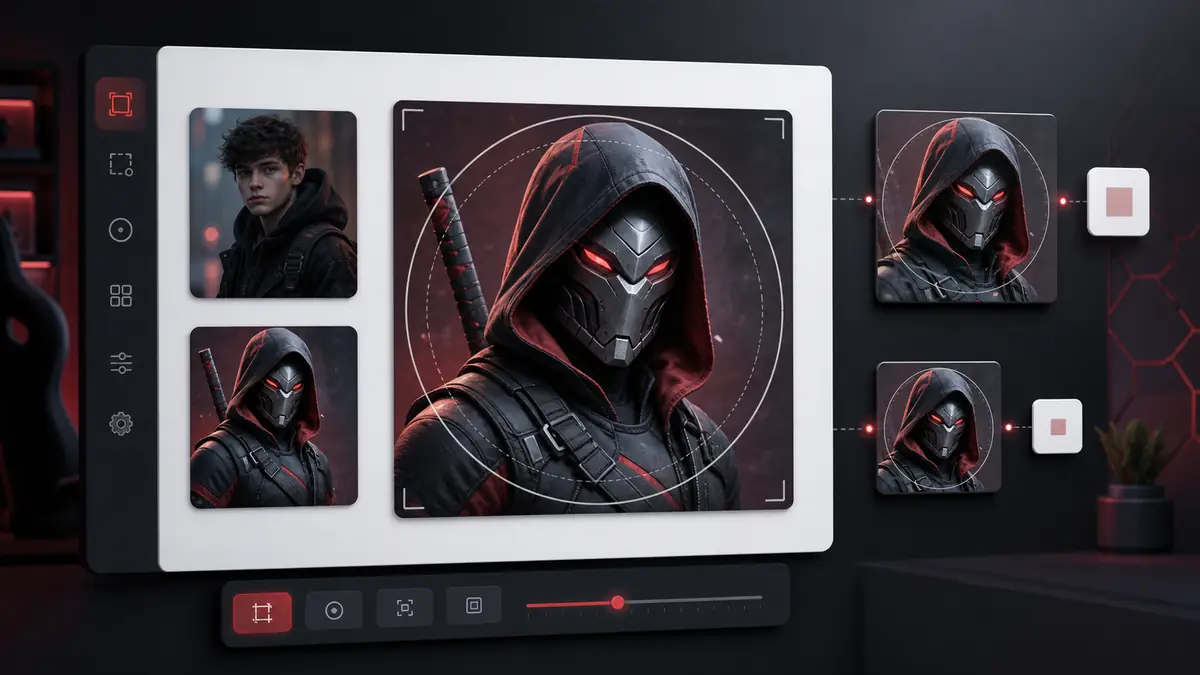
Prepare the Right Discord Profile Picture Size

This Discord profile picture size converter helps you prepare a square avatar before uploading it to Discord. The page defaults to 512x512 because many users prefer a sharper source file, while the 128x128 preset is available for the smaller Discord avatar baseline used by many size guides. Use the circle preview to keep faces, logos, game characters, and text away from the edge because Discord profile pictures are commonly displayed inside circular masks.

Discord profile picture size converter preview showing a 512x512 avatar with a circle safe area and 128x128 preset
Discord profile picture size preview: crop the subject, check the circle guide, and export 512x512 or 128x128.

How to make a Discord profile picture size

1

Upload a photo, logo, or avatar

Use a portrait, gaming avatar, anime-style image, team logo, server mark, or creator icon as your source image.

2

Keep the 512px preset or choose 128px

The default export is 512x512 for a sharper source. Choose 128x128 when a smaller exact Discord avatar size is required.

3

Use the circle preview

The preview guide shows where the circular avatar mask will sit, so important details do not sit too close to the edge.

4

Download the Discord PFP

Export as PNG, JPG, or WebP. PNG is usually best for logos, transparent details, and sharp illustrated avatars.

Discord avatar converter features

512x512 and 128x128 presets

The Discord profile picture size page includes both a high-quality 512px source preset and a compact 128px avatar preset.

Circle safe-area preview

A circular overlay helps you see whether the subject will remain readable when Discord displays the square file as a circle.

Crop or fit workflows

Use Crop and Zoom for a tighter avatar, or switch to Color Background or Blur Background if the full image should stay visible.

Works for people and logos

The tool can resize portraits, selfies, mascot art, initials, brand marks, server icons, and gaming avatars.

PNG-friendly output

PNG is useful for Discord profile picture size exports with hard edges, transparent logos, or illustrated avatar details.

Custom square size option

If Discord or another community platform needs a different square dimension, use Custom Size without switching tools.

Private local processing

Your avatar image is rendered in your browser. The page does not need to upload private profile images to a server.

Best uses for Discord profile pictures

Personal Discord avatars

Create a centered Discord PFP from a selfie, portrait, pet photo, game screenshot, or character image.

Gaming and community icons

Prepare an icon that remains readable in small chat lists, member lists, DMs, and community sidebars.

Logo and creator profiles

Fit a logo or creator mark into a square image with enough padding for circular display.

Server-style visual sets

Use the 512px preset for consistent avatar sources when making a group of related profile images.

Forum and chat avatars

The same square avatar source can also work for forums, Slack-style tools, gaming sites, and membership communities.

Fast upload fixes

Use this Discord profile picture size converter when an image is too wide, too tall, blurry after crop, or poorly centered.

Discord profile picture size FAQ

What Discord profile picture size should I use?

A 512x512 square is a strong default for a sharp source image, while 128x128 is a common compact Discord avatar baseline. This page offers both.

Why does this tool default to 512x512?

A larger square source can look sharper after platform processing. If you need the smaller exact avatar baseline, choose the 128px preset.

Does Discord show profile pictures as circles?

Discord commonly displays avatars inside circular masks. The circle preview helps you keep faces, logos, and text away from the edge.

Can I make a Discord PFP without cropping?

Yes. Switch from Crop and Zoom to Color Background or Blur Background when you need the full image visible.

Which format is best for a Discord avatar?

PNG is usually best for logos, text, and crisp illustrated avatars. JPG is fine for regular photos when file size matters.

Can I use this for Discord server icons?

You can use the same square workflow for server-style icons, but this page is primarily written for profile picture and avatar searches.

Is this affiliated with Discord?

No. Square Image Generator is an independent tool and is not affiliated with, endorsed by, or sponsored by Discord.

Does the tool support GIF avatars?

No. This first version focuses on static JPG, PNG, and WebP files. GIF support is not promised on this page.

Are my Discord avatar images uploaded?

No. The image conversion runs locally in your browser, and the file is downloaded back to your device.